How to build a website with AI in PRISMA VibeCode
Start with one page and one action for your visitor. This guide uses a coffee shop website to show what to ask for, how to test the result, and what to check before publishing.
1. Give your first page one job
A service landing page, portfolio, or event page is a good first project. Pick one goal: show the menu, give directions, or collect enquiries. Start with the public page before adding payments or customer accounts. Test integrations one at a time.
Open PRISMA VibeCode, sign in, and choose Site. Describe your audience, the action you want them to take, and the sections and information the page needs. PRISMA VibeCode builds the files and opens a preview in the editor.
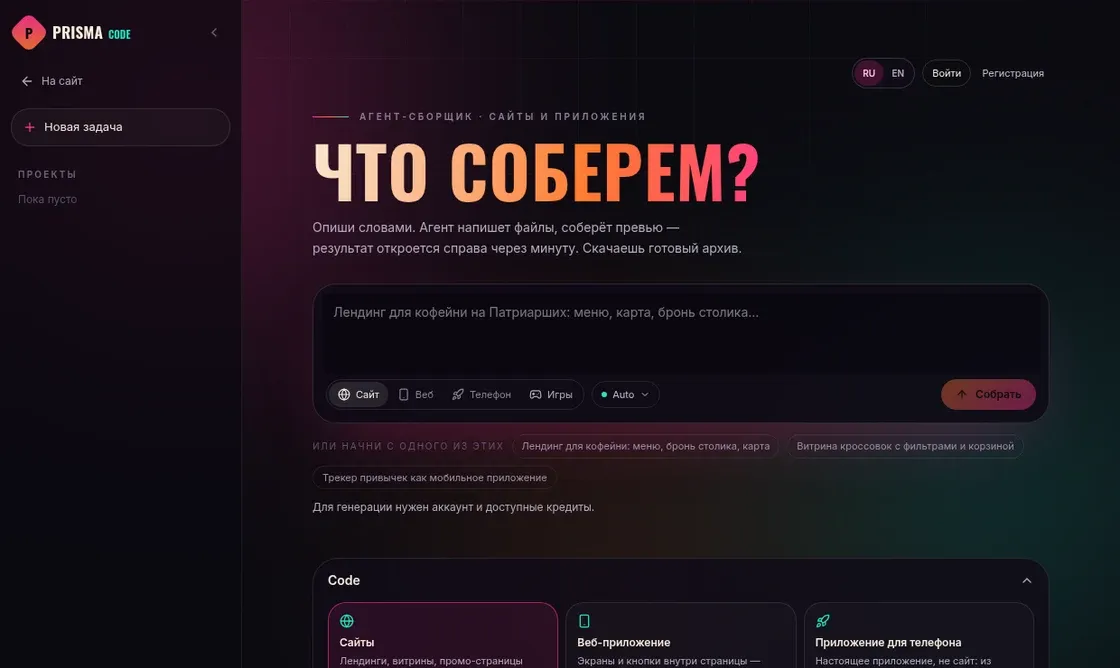
2. Start with this landing page prompt
Build a one-page website for a small coffee shop. Help visitors on a phone find the menu and get directions. Include a hero with a View menu button, a three-category menu, address, opening hours, and a Get directions button. Use a light background, dark text, and one terracotta accent. Make buttons easy to tap and text easy to read on a narrow screen. Leave clear placeholders for the address, prices and map link. Do not add payments or data collection forms.
Swap the coffee shop for your own project. Specify what should appear first and where the primary button should go. Add your brand colours and exact wording if you already have them. Keep passwords, API keys and customer data out of your prompt.
3. Test the preview and request focused edits
- Check mobile view: text should be readable without zooming, content should stay on screen and buttons should be easy to tap.
- Follow the visitor’s path: menu, address, directions. Check where links actually go.
- Replace placeholders with the real prices, hours and contact details. If you add an enquiry form later, send a test submission and confirm it arrives.
Ask for one change at a time in the project chat. For example: On mobile, place the Get directions button directly below the address. Keep the other sections unchanged. Small edits are easier to verify.
4. Download or publish the site
Use Download .zip in the editor to save the project files. If your account has publishing access, you can publish from the editor. Open the public URL in a private window and check the contact details, links and mobile layout again. The editor preview is not a public link.
Frequently asked questions
Do I need to know how to code?
You can build and revise a first landing page using plain language. Allow extra time to configure and test payments, accounts or any features that collect data.
Can I download or move the source files?
Yes. The editor exports a ZIP of the project files. Hosting requirements depend on what your project uses, including any external services.
Can I open PRISMA VibeCode without signing up?
The start page is public. Sign in to create and save projects.
PRISMA загружается...
Анализ личности на базе AI
0%